For Final Cut Pro · Built-in skin detection · Real-time, 100% on device
PowerSkin Natural Skin, Zero Plastic
Your skin retoucher. Drop PowerSkin on a clip and press Auto Fix:
PowerSkin finds the skin by itself, analyzes it, and sets itself. No masks to add, no tracking.
Acne, dark circles, redness and color casts disappear while real pores and structure stay.
When Skin Check glows green, your tones sit exactly on the vectorscope flesh line.
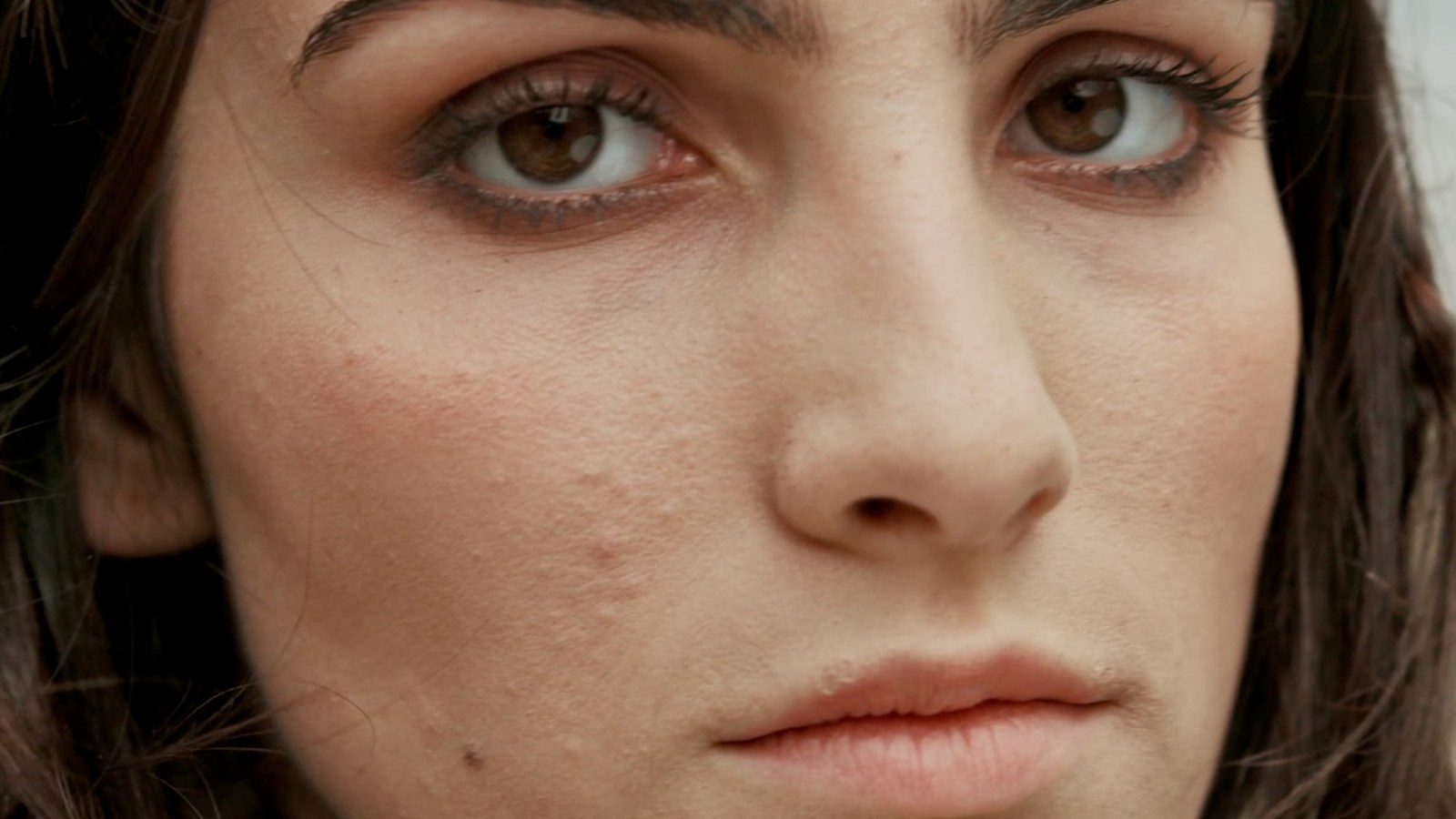
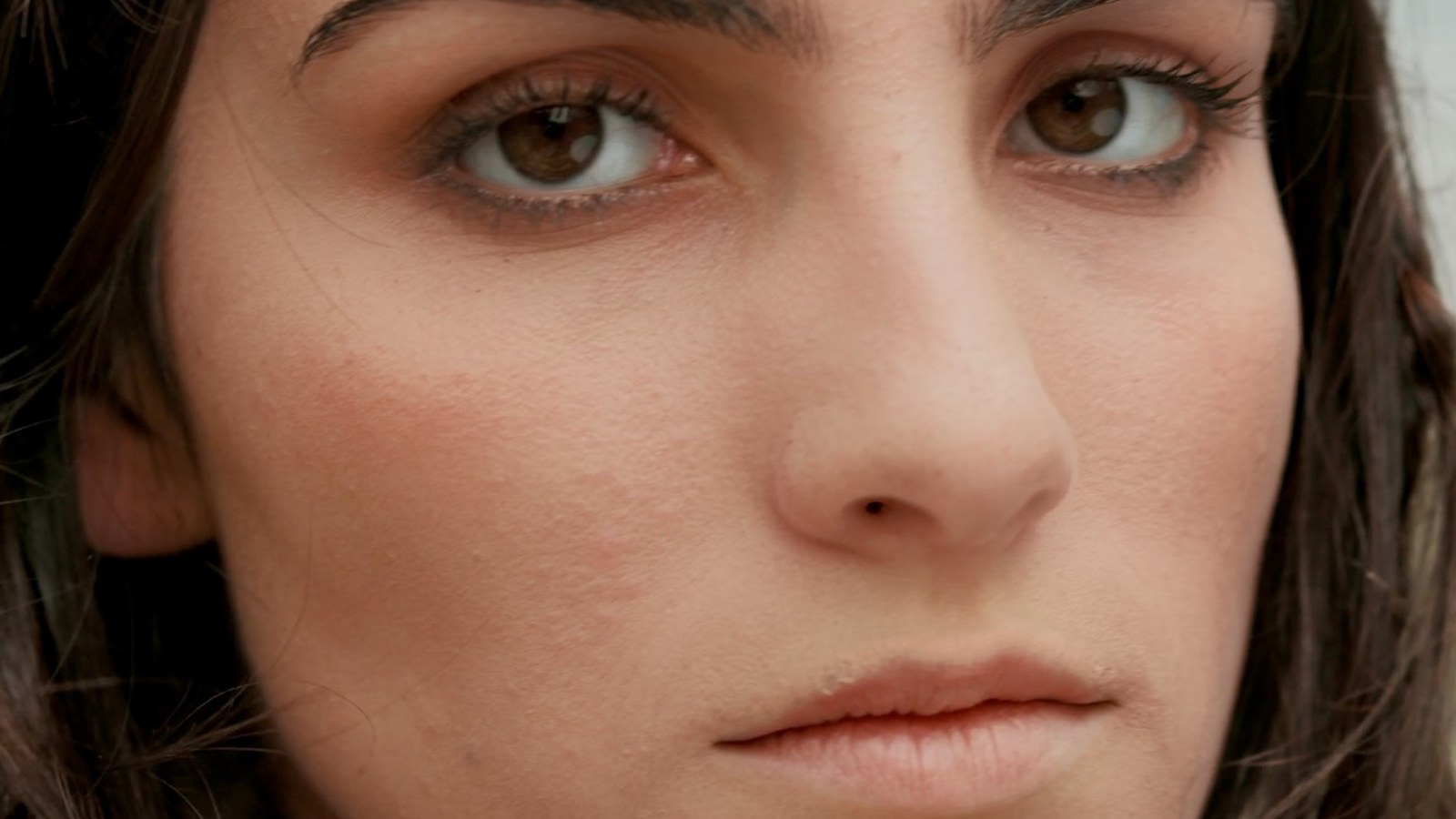
Real skin, real 16:9 frames. Left is the original, right is PowerSkin. Pores, structure and expression stay put; blemishes, redness and shadows ease off.
BeforeAfter
Real PowerSkin output on real footage. Every pixel on the right came from the frame on the left: corrected, never generated.
The No-AI Promise
Corrective, not generative
PowerSkin is old-school retouching at modern speed. It corrects what your camera actually
captured. It never invents skin, never swaps in synthetic pixels, and never lets a model
guess what a face should look like. No AI touches your skin.
Corrective
Every pixel on screen came from your footage. Smoothing, blemish removal and tone
correction adjust the real image, nothing is generated.
Non-destructive
The effect sits on top of your clip. Toggle it off and the original footage is
right there, untouched, every time.
No generative AI
A deterministic GPU pipeline, the same math every frame. Nothing is
invented, nothing shimmers, nothing leaves your Mac.
Why PowerSkin
Retouching that respects skin
Texture-preserving smoothing
Three-band frequency separation keeps pores and facial structure intact while
evening out skin. Restore Details brings real pores and features back
everywhere except on the blemishes and discoloration it removed, and
Auto Scale sizes everything to the face, so wide shots and close-ups get
the same look without keyframes.
Targeted blemish removal
Acne, moles and spots are detected as outliers and lifted out individually.
Normal micro-shading passes through untouched: no airbrushed mush.
Redness & discoloration
Broken capillaries, irritation and patchy color pulled back toward the
surrounding skin tone, without shifting the overall look.
Shadow Lift
Dark circles and eye bags brightened and de-blued, with a soft limit so real
facial structure keeps its shape.
Skin Tone Correct
One slider rotates skin onto the vectorscope flesh line: the hue every healthy
complexion shares. Casts gone, complexion untouched.
Skin Check view
No scopes knowledge needed: skin glows green when tones are right, red when they're
not, with a live mini-vectorscope built into the viewer.
Auto Skin: no mask needed
PowerSkin measures the skin color inside the detected face on every frame and
limits itself to it, all on the GPU. No Auto Mask, no rotoscoping, no tracking,
and none of the slowdown that comes with Final Cut's masking. Hue, Saturation
and Brightness ranges tune it like a color mask, and one click samples the skin
color on shots with a heavy cast. Prefer Auto Mask? It still works, on top.
Real-time Metal. No AI flicker.
A deterministic GPU pipeline, not a neural net: real-time at 4K and perfectly
stable frame to frame. Skin never shimmers.
Try before you buy
Fully-featured 7-day free trial. When it ends, one key unlocks
PowerSkin for good, no subscription.
Workflow
Three steps to better skin
1
Apply PowerSkin
Effects → ⚡️PowerApps → Effects. Drop it on the clip.
2
Check the skin mask
Auto Skin is on by default. Tick Show Skin Mask once to see what it
found, then untick. No Final Cut mask needed.
3
Press Auto Fix
PowerSkin analyzes the skin and sets the sliders for you, then tweak to
taste. Skin Check confirms your tones with a green glow.
Share PowerSkin and the other PowerApps with your audience and earn a commission on every sale through your link. Free to join, 30-day tracking, monthly PayPal payouts.